API help

Avatar
  • updated

Hi,

I'm newt the api's. I'd like to get some information from our Bose. but I don't know how to get started with the api.

this is what I want to do:

https://bosedevs.bose.com/discussion/433/power-control

do I use http or basic devices, how do I put the get command in the api (command, string,....?)

thanks in advance,

Dave

Avatar
Dave De Busschere

unable to read data from the transport connection

Avatar
Ricardo Pinto

I've reached my computer now...

To place a button as "Run function":

- Right button click on your visualization;

- Add Object Control;

- Go to your Http device created for the volume;

- Expand that Http device, where you'll find your command;

- Choose that command, and on the dropdown menu Control, choose Send(RunFunction);

That way your button will send that command.

As I don't own any SoundTouch products, I can't say if the command and data fields are correct. Probably you'll need to fiddle around until you get the command working...

Best regards

Avatar
Ricardo Pinto

Hi,

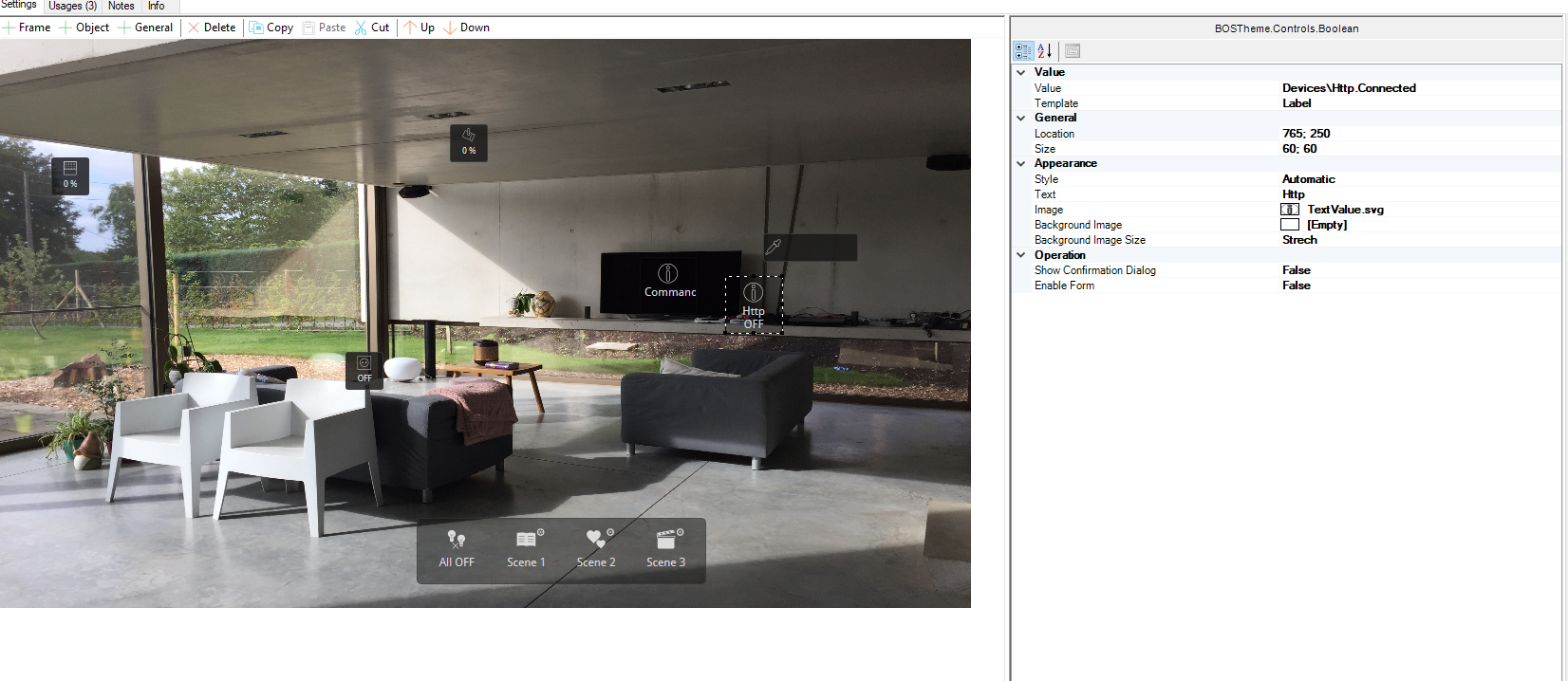
You are actually placing not a button, but a label... If you notice, you're "button" is showing as a label for Http.Connected info, so you'll never be able to "send" anything.

Double check it. When you place the right http command on the visualization, one of the options shown is "Send".

I'm not with my computer right now, but I'll check it later to tell you how to place the right command button.

Best regards

Avatar
Dave De Busschere
Quote from Ricardo Pinto

Hi,

According to documentation of the SoundTouch API, you can control your BOSE products using third party software, like bOS.

For that, you need to use HTTP devices, to mimic the commands you need to send to the SoundTouch products.

"All data for the SoundTouch Control API is formatted as XML. When sending a GET or POST request you must format the data in the correct XML structure, rather than using key-value pairs. Similarly, all responses will be returned in an XML format that you must parse. Properties will be attributes, elements, or content.".

Volume POST example:
<?xml version="1.0" ?>

<volume>$INT</volume>

You can do a quick test, for let's say change volume:

- Find one of your SoundTouch products, and find out its LAN IP address
- Create a HTTP device on bOS
- Set Enable to True
- On Host URL, insert the SoundTouch IP address
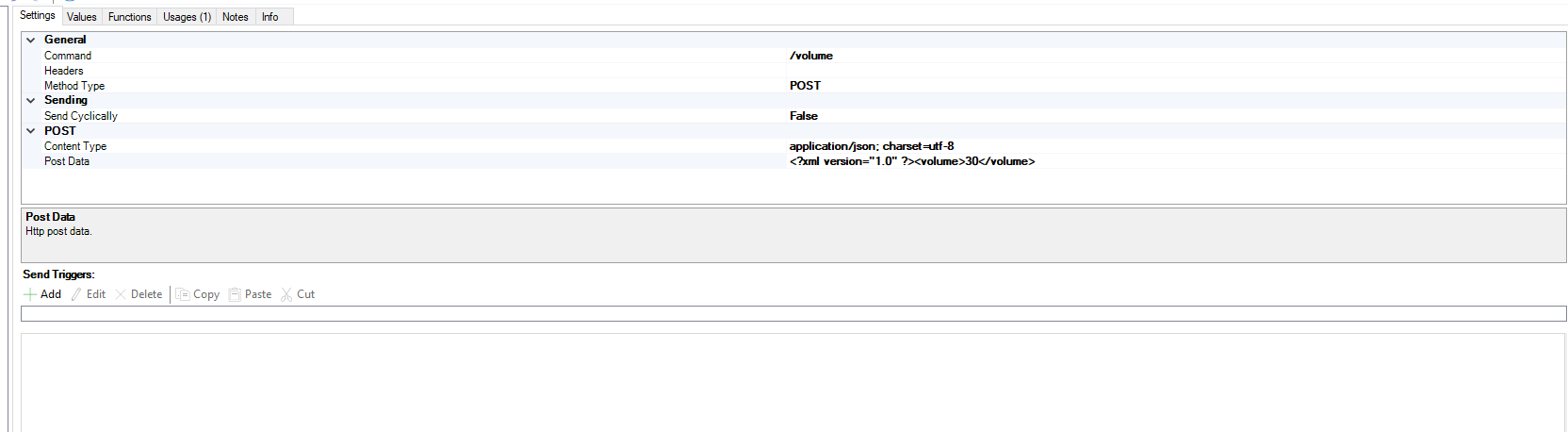
- Right mouse click on the HTTP device and add a Command
- On the Command, insert /volume
- Choose POST as method type
- On Post Data, insert:

<?xml version="1.0" ?>

<volume>50</volume>


- Use the HTTP device on visualization to send that command

And see if it works. I don't own any SoundTouch product, so I can't test it out. I just read some quick info on the BOSE Developer portal.

Best regards

Thanks for the clear step by step tutorial.

- The parsing (http) I set type to xml?

In the visualization I put a command button, but I don't get any action/response. 

I guess that the volume should increase to 50 <volume>50</volume> when I press the button.


Avatar
Ricardo Pinto

Hi,

According to documentation of the SoundTouch API, you can control your BOSE products using third party software, like bOS.

For that, you need to use HTTP devices, to mimic the commands you need to send to the SoundTouch products.

"All data for the SoundTouch Control API is formatted as XML. When sending a GET or POST request you must format the data in the correct XML structure, rather than using key-value pairs. Similarly, all responses will be returned in an XML format that you must parse. Properties will be attributes, elements, or content.".

Volume POST example:
<?xml version="1.0" ?>

<volume>$INT</volume>

You can do a quick test, for let's say change volume:

- Find one of your SoundTouch products, and find out its LAN IP address
- Create a HTTP device on bOS
- Set Enable to True
- On Host URL, insert the SoundTouch IP address
- Right mouse click on the HTTP device and add a Command
- On the Command, insert /volume
- Choose POST as method type
- On Post Data, insert:

<?xml version="1.0" ?>

<volume>50</volume>


- Use the HTTP device on visualization to send that command

And see if it works. I don't own any SoundTouch product, so I can't test it out. I just read some quick info on the BOSE Developer portal.

Best regards