Hidden Panel

Avatar
  • updated

Hello,

i have an issue with PanelLink. I like to have a hidden panel which is password protected.
This works fine. But if I close the hidden panel by pressing the HOME button, the hidden panel is accessible with the two arrows in the top left corner.

What can I do to avoid that?

Best regards
Samuel

Avatar
Jürgen Jürgenson

Hey

It will only let you see the panel if you already have entered the correct pin. There is a lock timeout setting for 1min by default, after it will ask for the pin again, or if you logout you will need to enter it again. But after 1min it shouldn't be accessible from the arrows.

Edit: Ok after I tested it seems that it restarts the lock counter if you keep switching between panels with the arrows. If you stay on the hidden panel for 1min then it again locks it or if you don't look at it for 1min. But yeah I was able to stay on for longer if I kept switching before the lock timeout.

Avatar
Samuel Ingold
Quote from Jürgen Jürgenson

Hey

It will only let you see the panel if you already have entered the correct pin. There is a lock timeout setting for 1min by default, after it will ask for the pin again, or if you logout you will need to enter it again. But after 1min it shouldn't be accessible from the arrows.

Edit: Ok after I tested it seems that it restarts the lock counter if you keep switching between panels with the arrows. If you stay on the hidden panel for 1min then it again locks it or if you don't look at it for 1min. But yeah I was able to stay on for longer if I kept switching before the lock timeout.

Hey Jürgen,
Thank you very much for looking into this.
It would be really nice if there was some kind of logout function. Or if you were automatically logged out when you left the panel.
Regards
Samuel

Avatar
Jürgen Jürgenson
Quote from Samuel Ingold

Hey Jürgen,
Thank you very much for looking into this.
It would be really nice if there was some kind of logout function. Or if you were automatically logged out when you left the panel.
Regards
Samuel

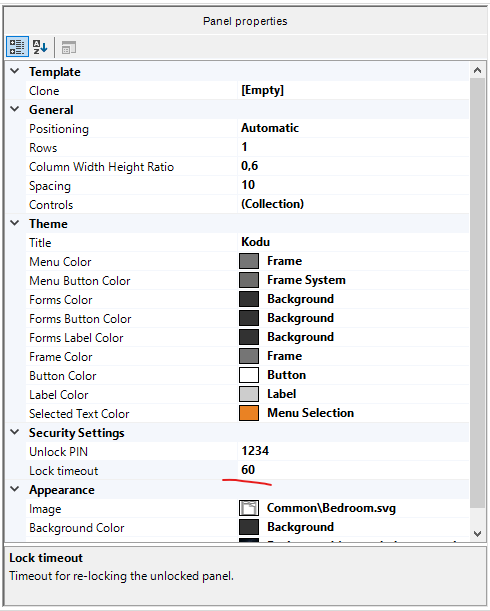
You can make the timeout shorter from here - Select the main theme node to see the setting. 

Image 5529

Avatar
Samuel Ingold

But with PanelLink, which I think is the smarter option because it assigns different login pins, the timeout doesn't work at all. Is there perhaps a way to log out via a script in the background?

Avatar
Jürgen Jürgenson
Quote from Samuel Ingold

But with PanelLink, which I think is the smarter option because it assigns different login pins, the timeout doesn't work at all. Is there perhaps a way to log out via a script in the background?

Panellink confirmation works differently - it has no lock timeout. So what you could do it make a hidden panel - set its lock timeout with the shortest value and lock it. Then make your panellink with confirmation password. Then it can have 2 different passwords - but only the Panel itself is locked after the timeout. So it still has some security.