Android shuts down the project but not the application

Hello everyone,

I'm reaching out for your expertise because I've been having a problem since installing bOS Client on my Samsung Galaxy A9+ Android tablet.

It's mounted on the wall, with the screen always on. The goal is to keep the project open continuously.

Randomly and unpredictably, the project closes and doesn't automatically reconnect; it just keeps spinning "1..2..3....10..1.."

I have to cancel the automatic reconnect and click on the project again for it to open without any problems.

Has anyone else encountered this issue?

Thank you in advance.

Sincerely,


En Français :

Bonjour à tous,

Je fais appel a vos connaissances car je rencontre un problèmes depuis l'installation de bOS Client sur ma tablette Android Samsung Galaxy A9+.

Celle ci est installée au mur, écran toujours allumé. Le souhait est de rester continuellement sur le projet ouvert.

De façon aléatoire et non prévisible, le projet se ferme et l'auto reconnecte ne se fait pas, il tourne dans le vide "1..2..3....10..1.."

Il me faut annuler l'auto reconnecte et cliquer a nouveau sur le projet pour que celui s'ouvre sans problèmes.

Quelqu'un a t-il déjà rencontré ce problème ?

Par avance merci à vous

Cordialement

Hello,
Don't know if it has anything to do, but I had similar problems on clients, when the app was basically not closed, but "minimized" instead (like pressing the home button and therefore throwing back the app to the background).
What happened is that the Android OS has a feature, which prevents certain apps to be kept alive. In most of the manufacturers it's called Battery Saver, etc, it really depends on the brand.
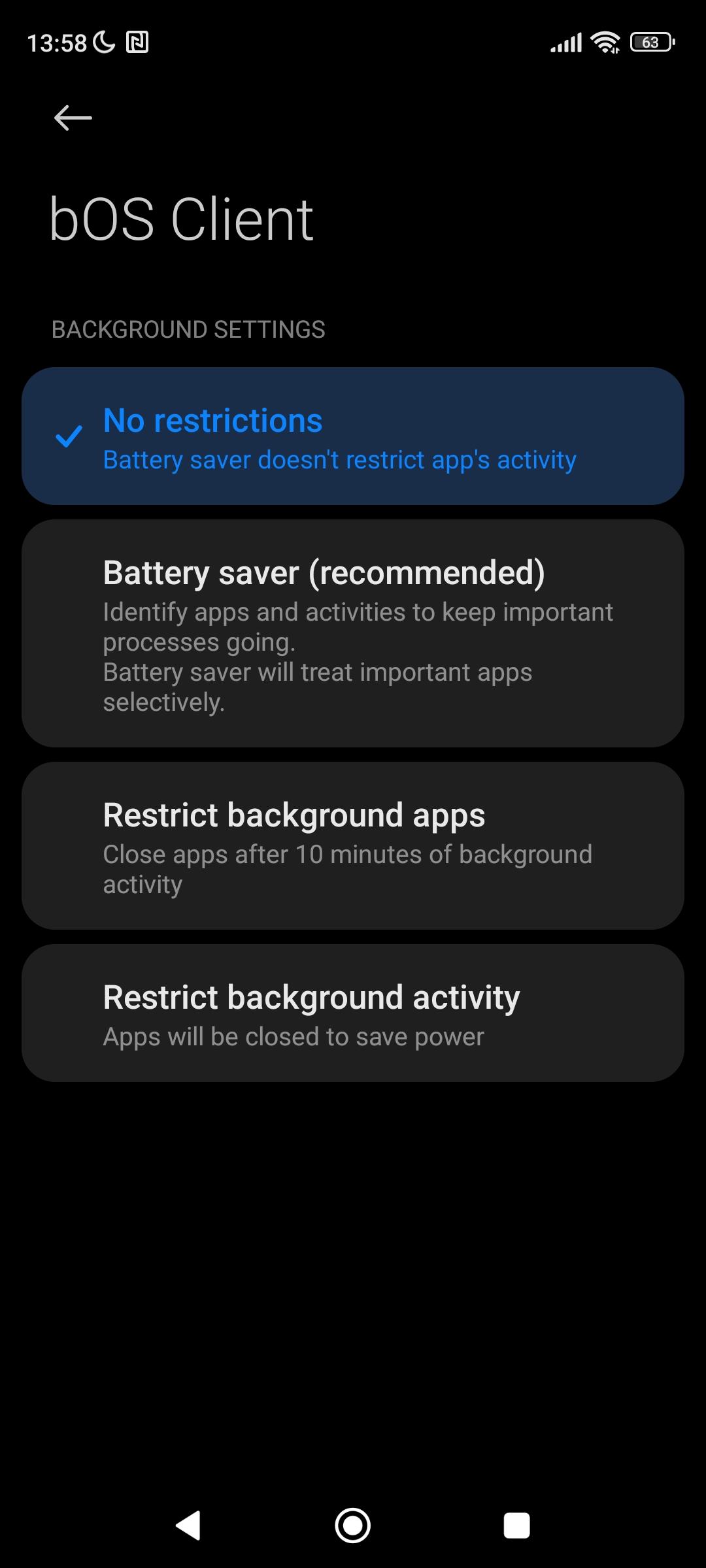
What I do, is go to the app settings (specifically the bOS Client settings, where you configure the OS notifications, permissions, etc), and usually there's a feature to configure how the device will behave with the app.
In my case, every app falls on the "Battery Saver (Recommended)" choice on my phone. I change the setting to "No restrictions", and the Android OS never "kills" the app, preventing the bOS Client to get on the limbo.
On several clients where I haven't changed that setting in the beggining, I had the same problem, finding the app reloading and counting after getting the app from the background. Stopping and opening again the server, would work. So, after changing this battery saving setting for the bOS Client, this issue ended up completely.
For what you're telling, even if the app is kept with always on display, I'm pretty sure the underlaying OS is somehow not keeping the bOS Client process alive, due to this battery saving technique.
Try this, to see if it helps, probably it can be the cause.
Best regards