Android shuts down the project but not the application

Avatar
  • updated
Hello everyone,

I'm reaching out for your expertise because I've been having a problem since installing bOS Client on my Samsung Galaxy A9+ Android tablet.

It's mounted on the wall, with the screen always on. The goal is to keep the project open continuously.

Randomly and unpredictably, the project closes and doesn't automatically reconnect; it just keeps spinning "1..2..3....10..1.."

I have to cancel the automatic reconnect and click on the project again for it to open without any problems.

Has anyone else encountered this issue?

Thank you in advance.

Sincerely,


En Français :

Bonjour à tous,

Je fais appel a vos connaissances car je rencontre un problèmes depuis l'installation de bOS Client sur ma tablette Android Samsung Galaxy A9+.

Celle ci est installée au mur, écran toujours allumé. Le souhait est de rester continuellement sur le projet ouvert.

De façon aléatoire et non prévisible, le projet se ferme et l'auto reconnecte ne se fait pas, il tourne dans le vide "1..2..3....10..1.."

Il me faut annuler l'auto reconnecte et cliquer a nouveau sur le projet pour que celui s'ouvre sans problèmes.

Quelqu'un a t-il déjà rencontré ce problème ?

Par avance merci à vous

Cordialement
Avatar
Ricardo Pinto

Hello,

Don't know if it has anything to do, but I had similar problems on clients, when the app was basically not closed, but "minimized" instead (like pressing the home button and therefore throwing back the app to the background).

What happened is that the Android OS has a feature, which prevents certain apps to be kept alive. In most of the manufacturers it's called Battery Saver, etc, it really depends on the brand.

What I do, is go to the app settings (specifically the bOS Client settings, where you configure the OS notifications, permissions, etc), and usually there's a feature to configure how the device will behave with the app.

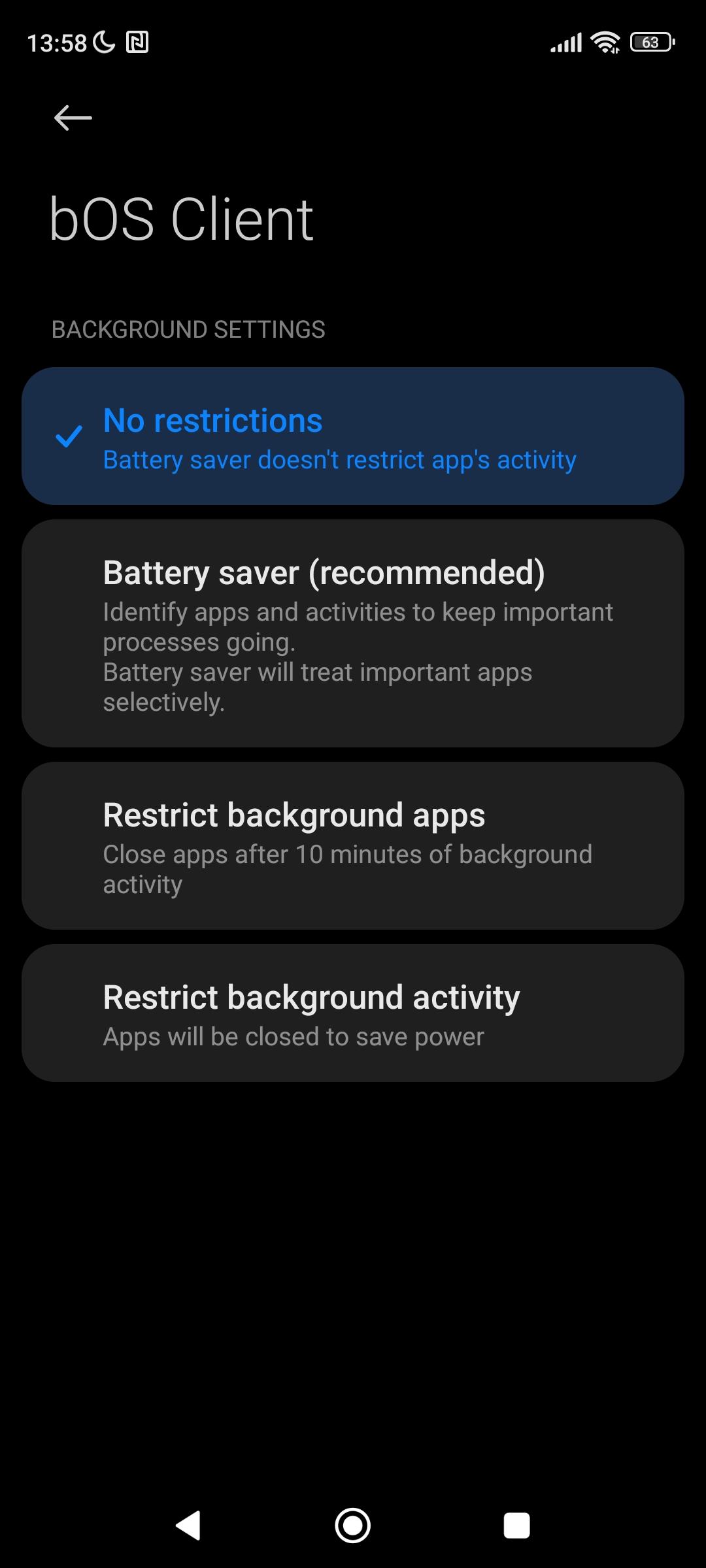
In my case, every app falls on the "Battery Saver (Recommended)" choice on my phone. I change the setting to "No restrictions", and the Android OS never "kills" the app, preventing the bOS Client to get on the limbo.

On several clients where I haven't changed that setting in the beggining, I had the same problem, finding the app reloading and counting after getting the app from the background. Stopping and opening again the server, would work. So, after changing this battery saving setting for the bOS Client, this issue ended up completely.

For what you're telling, even if the app is kept with always on display, I'm pretty sure the underlaying OS is somehow not keeping the bOS Client process alive, due to this battery saving technique.

Try this, to see if it helps, probably it can be the cause.

Image 5530

Best regards

Avatar
Simon Hannecart
Quote from Ricardo Pinto

Hello,

Don't know if it has anything to do, but I had similar problems on clients, when the app was basically not closed, but "minimized" instead (like pressing the home button and therefore throwing back the app to the background).

What happened is that the Android OS has a feature, which prevents certain apps to be kept alive. In most of the manufacturers it's called Battery Saver, etc, it really depends on the brand.

What I do, is go to the app settings (specifically the bOS Client settings, where you configure the OS notifications, permissions, etc), and usually there's a feature to configure how the device will behave with the app.

In my case, every app falls on the "Battery Saver (Recommended)" choice on my phone. I change the setting to "No restrictions", and the Android OS never "kills" the app, preventing the bOS Client to get on the limbo.

On several clients where I haven't changed that setting in the beggining, I had the same problem, finding the app reloading and counting after getting the app from the background. Stopping and opening again the server, would work. So, after changing this battery saving setting for the bOS Client, this issue ended up completely.

For what you're telling, even if the app is kept with always on display, I'm pretty sure the underlaying OS is somehow not keeping the bOS Client process alive, due to this battery saving technique.

Try this, to see if it helps, probably it can be the cause.

Image 5530

Best regards

Bonsoir,

Je viens d'essayer et je vous tiens au courant d'ici quelques jours.

Merci pour l'aide.

Bonne soirée :)

Avatar
Simon Hannecart

Bonjour,

Malgré cette solution, je rencontre toujours ce problème.

D'après vous, existerai t-il une méthode pour couper une application et l'ouvrir avec un script ou autre méthode ?


L'idée est de pouvoir contourner ce phénomène en forçant l'extinction et l'allumage par exemple chaque demi journée.


D'avance merci pour l'aide.


Bonne journée.

Avatar
Simon Hannecart

Bonjour, 

Je viens tenir informé tout le monde. J'ai essayé avec une autre tablette, mise au même endroit, celle ci ne pose pas de problème.

J'en conclue que le problème doit venir de la tablette. Je vais la réinitialiser pour voir.


Je vous tiendrai informé.


Bonne journée.

Avatar
Simon Hannecart
Hello everyone,


After resetting the tablet, the problem persists.


I also realize I made a mistake in the initial problem description; it's not an A9+ tablet but an A8+.


I suspect an incompatibility between the BOS Client and the Android version, which is causing the display to cut out randomly.


@ComfortClick, could you help me? Also, I'm concerned that a tablet with the latest compatible versions is always required for everything to work perfectly.


If you need help with any troubleshooting or checks to detect this bug (which is only visible if the tablet is continuously running the app in Wall mode), please let me know.

Thanks for help


Software Differences Between A8+ and A9+


A8+ (Experiencing the Issue):


One UI Version: 6.1

Android Version: 14

Google Play System Update Date: January 1, 2026


A9+ (Working Without Issues):


One UI Version: 8.0

Android Version: 16

Google Play System Update Date: September 1, 2025


EN FRANCAIS :


Bonjour à tous, 

Après réinitialisation de la tablette, le problème persiste.

Je m’aperçois en plus m’être trompé sur le descriptif du problème initial, il ne s'agit pas d'une tablette A9+ mais A8+.

Je suspecte une incompatibilité entre le bOS Client et la version Android, qui ferait couper la visu de façon aléatoire...

@ComfortClick, auriez vous de l'aide a m'apporter ? Par ailleurs je m'inquiète qu'il faille toujours une tablette avec les dernières versions compatibles pour que tout fonctionne parfaitement ??

Si besoin de réaliser des manipulations ou vérifier des choses pour détecter ce bug (qui n'est visible que si la tablette est continuellement sur l'application en mode Wall) je me tiens a votre disposition.

Différences logiciel entre A8+ et A9+

A8+ (rencontre le pb) :

Version ONE UI : 6.1

Version Android : 14

Date Maj systeme Google Play: 01/01/2026

A9+ (fonctionne sans pb) :

Version ONE UI : 8.0

Version Android : 16

Date Maj systeme Google Play : 01/09/2025


Avatar
Ricardo Pinto

Hello,

I don't think that the problem is due to the Android OS version.

In fact, in the Play Store it says "Android 5.0 and up".

Furthermore I still have an old Huawei tablet that still resists here at home, and actually it's not being used actively. It runs on Android 8, and the bOS still runs perfectly.

When you leave the tablet, can you tell how long it takes to become irresponsive?

Have you already checked the battery saving options?

Settings > Battery and device care > Learning usage patterns > Disable power saving

Settings > Battery > Disable Power saving

Settings > Battery > Background usage limits > Disable Put unused apps to sleep (and add the bOS to the Never auto sleeping apps)

Also you need to check on the app itself (bOS), if any battery saving mode is being applied. Usually this is done by long pressing the icon, clicking on the "i" icon, and look after any battery saving options and disable it.

Best regards

Avatar
Simon Hannecart

Hello,

Thank you for your reply. Something's definitely wrong then.

My A9 tablet (working) and my A8 (not working) have the same settings because they're factory defaults.

To answer your questions:

- When you leave the tablet, how long does it take for it to become unresponsive?

--> It's very random; it happens twice in one hour, nothing in eight hours...

Have you already checked the battery saving options?

--> Yes

Settings > Battery and device care > Learning usage patterns > Disable power saving

--> It was enabled on both tablets. I disabled it, but the problem persists on the A8.

Settings > Battery > Background usage limits > Disable Put unused apps to sleep (and add the bOS to the Never auto sleeping apps)

--> It was enabled on both tablets. I enabled it, but the problem persists on the A8. However, I can't find the application to add it; it doesn't appear...

Thank you for your help.

Sincerely,

EN FRANCAIS :

Bonjour,

Merci pour ta réponse. Il y a quelque chose de bizarre alors,


Ma tablette A9 (fonctionnelle) et la A8 (non fonctionnelle) ont les mêmes réglages car réglages d'usines.


Pour répondre à tes questions :


- When you leave the tablet, can you tell how long it takes to become irresponsive?

--> C'est très aléatoire, deux en 1h, rien en 8h...


Have you already checked the battery saving options?

--> Oui


Settings > Battery and device care > Learning usage patterns > Disable power saving

--> Sur les deux tablettes, c'était activé, je l'ai désactivé mais le défaut est toujours présent sur la A8


Settings > Battery > Background usage limits > Disable Put
unused apps to sleep (and add the bOS to the Never auto sleeping apps)

--> Sur les deux tablettes, c'était activé, je l'ai activé mais le défaut est toujours présent sur la A8, en revanche, je n'arrive pas a trouver l'application pour l'ajouter, elle n'apparait pas...


Merci pour ton aide.


Cordialement,