KNX variable not sent cyclically despite “Send Value Cyclically” enabled

Avatar
  • updated

Hi,

I have a KNX variable for which I enabled cyclic value sending every 15 minutes, but the server does not seem to send the value to the KNX bus.

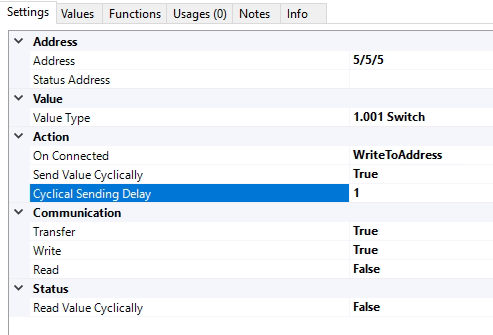
The relevant settings are:

  • Value Type: 1.001 Switch
  • On Connected: WriteToAddress
  • Send Value Cyclically: True
  • Cyclic Sending Delay: 15
  • Transfer: True
  • Write: True
  • Read: False

I have attached a screenshot of the configuration.

We also have an independent KNX bus logger running, and there is no trace of any telegram from this group address being sent cyclically every 15 minutes. So it seems that the cyclic transmission is not being triggered at all.

Am I missing any additional setting required for cyclic sending?

Also, what is the best way to diagnose this in bOS? Is there any internal log or debug option where I can verify whether the cyclic write is actually being triggered?
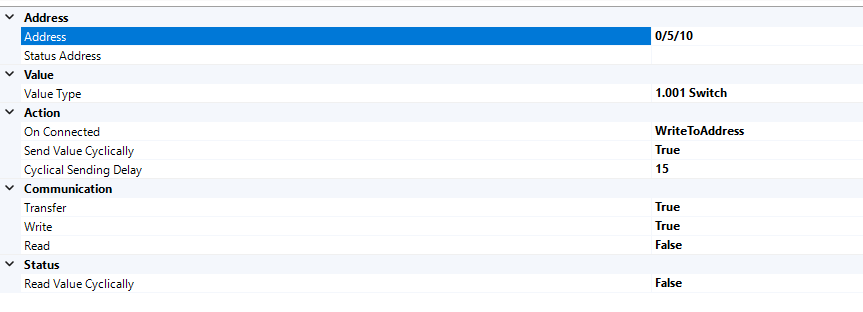
Image 5651

Avatar
Maciej Kapica

The issue has been identified and resolved.

The problem was related to the KNXnet/IP (Falcon) driver. With this driver, the “Send Value Cyclically” function was not actually sending the KNX value to the bus.

ComfortClick support was able to reproduce the issue on a Grinder server as well.

The workaround is to change the KNX connection driver from:

KNXnet/IP (Falcon)

to:

KNXIP


After changing the driver, cyclic sending did not start immediately in my case, but after restarting the bOS server it started working correctly. The values are now being sent cyclically at the configured interval as expected.

So if anyone encounters the same problem:

  1. Check which KNX driver is being used.
  2. If it is KNXnet/IP (Falcon), try switching to KNXIP.
  3. Restart the bOS server.

ComfortClick has also created an internal ticket to investigate/fix the issue with the Falcon driver.

Many thanks to David and the ComfortClick support team for taking the time to reproduce the problem and find the actual cause.

Avatar
Ricardo Pinto

I advise you to open a support ticket, via the new Jira Service Management, as this is probably not something that we (users / installers) can help to solve.


As stated, I was able to conduct successfully some tests with different servers. So it's better to have some help from someone from the ComfortClick for this matter, as I wasn't able to reproduce your issue, nor able to help you further.

https://www.comfortclick.com/Account/SupportTickets

Best regards,

Ricardo

Avatar
Maciej Kapica

I know ;) That's why I'm seekeng solution :) Creating fake variable doesn't change anything, still no cyclical sending :(

Avatar
Ricardo Pinto

You're totally right. Wrongly assumed that a KNX variable is created empty.

Back to business:


Created a "fake" KNX variable, with 5/5/5 address, and turned on the cyclically send.

Tested on my Jigsaw Pro running Alpha version, no problems here, the variable is being written;

Image 5657

Also tested on a way older Grinder, still running on 4.11.5 version, and also couldn't find any issues, the variable is also written...

Image 5658


Image 5659


Your case is very odd...

Avatar
Maciej Kapica

Yes and no. ComfortClick assumes some value when creating variable so it shouldn't be an issue. I did a test on another server and it works as is should: variabl created, set for cyclical sending every 1 minute and it works - sends every minute (but not every minute after change of status but every round minute /zero seconds/ - not an issue but an observation) The same config, the same address etc. It's like an internal clock or other process on the system is not counting cyclical sending time :(

Avatar
Ricardo Pinto

So it's not an actually KNX variable, but something coming from bOS (like a bit variable ) that you want to write it down on a KNX address, right?

Kind of, a 1bit variable that you created on bOS, and you want to write it down. The issue here, if it's an internal variable, how are you associating that variable to that address? A task program? The knx address as reference of that variable?

Because, you can create a KNX address, and create an internal variable, but you have to associate that value to the KNX address, otherwise the KNX doesn't know what to send...

I will test some examples, so I can test it works so we can find what's missing.


Best regards

Avatar
Maciej Kapica

Hi,

Grinder 4.11.72

It's an internal binary variable that should be sent to KNX. So once set in ComfortClick it should be send to KNX every n minutes.

Avatar
Ricardo Pinto

Hello,

Where is your value coming from (like a temperature, etc?), so I can eventually do a similar test?


I'm using / testing Alpha version, but I have plenty of clients where I can run a similar test.

Also I'd like to know what's your server version.


Best regards

Avatar
Maciej Kapica

OK, I understand, and yes — that is exactly the expected behavior.

The problem is that it simply does not work on my system.

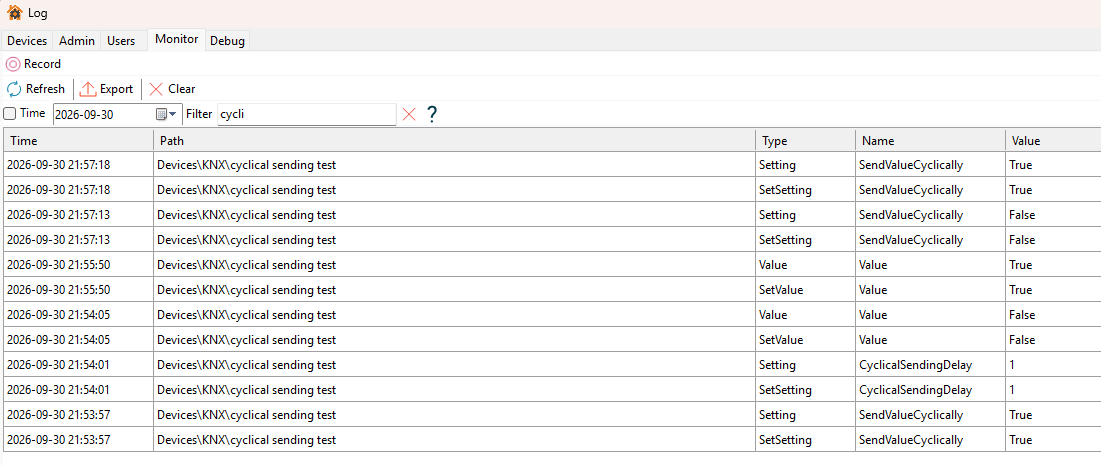
I also made a very simple test variable and attached the log from this test.

The test procedure was:

  • enabled “Send Value Cyclically”
  • set the cyclic delay to 1 minute
  • manually changed the value to False
  • waited more than 1 minute — nothing was sent
  • manually changed the value to True
  • waited more than 1 minute — again, nothing was sent
  • disabled “Send Value Cyclically”
  • enabled it again
  • still nothing was sent

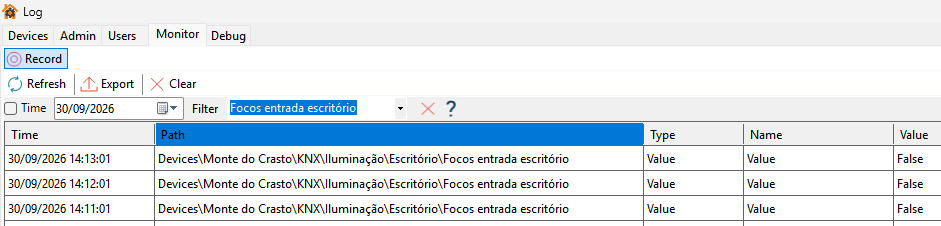
In the debug log I can see the configuration changes themselves, for example when I change the cyclic delay from 15 minutes to 1 minute, but there is no event after the configured interval and no KNX telegram is sent.

Our independent KNX logger confirms the same — there is no cyclic telegram on the bus.

So the question is really how to diagnose this from the ComfortClick side. The configuration seems correct and this should work, but on this server it does not.

Is there any way to verify whether the cyclic timer is actually running or whether bOS is attempting to trigger the write? Any specific debug log category, internal diagnostic tool, or service that should be checked?

Image 5656

Avatar
Ricardo Pinto

On the Config tool, on the bottom of the screen, where it shows the notifications, you can click on that to bring up the Log tools.

If you go to the Monitor tab, and click Record, you can see the values going through.

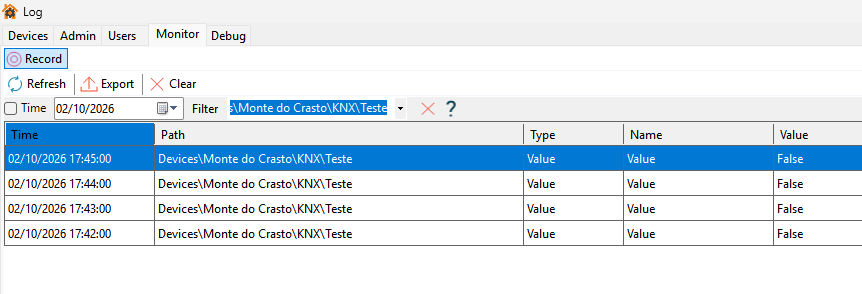
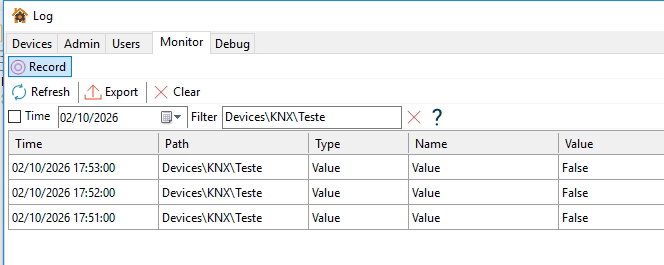
In my case, everything looks good, just like in ETS. In this case the light was off, so it's actually being written as false every 1m.

Image 5654

Best regards