Schedule problem

Avatar
  • updated

Hi everyone.

I've noticed some strange behavior with the schedules. When I add several events with the same trigger time, only one of them is executed, while the others are ignored. Selecting the “Execute on Restart” option also triggers only one event, even though all events are set the same trigger time.


As far as I recall, the previous version of the schedules from a few years ago (bOS Configurator 4.8.20) worked correctly and triggered all items with the same trigger time.
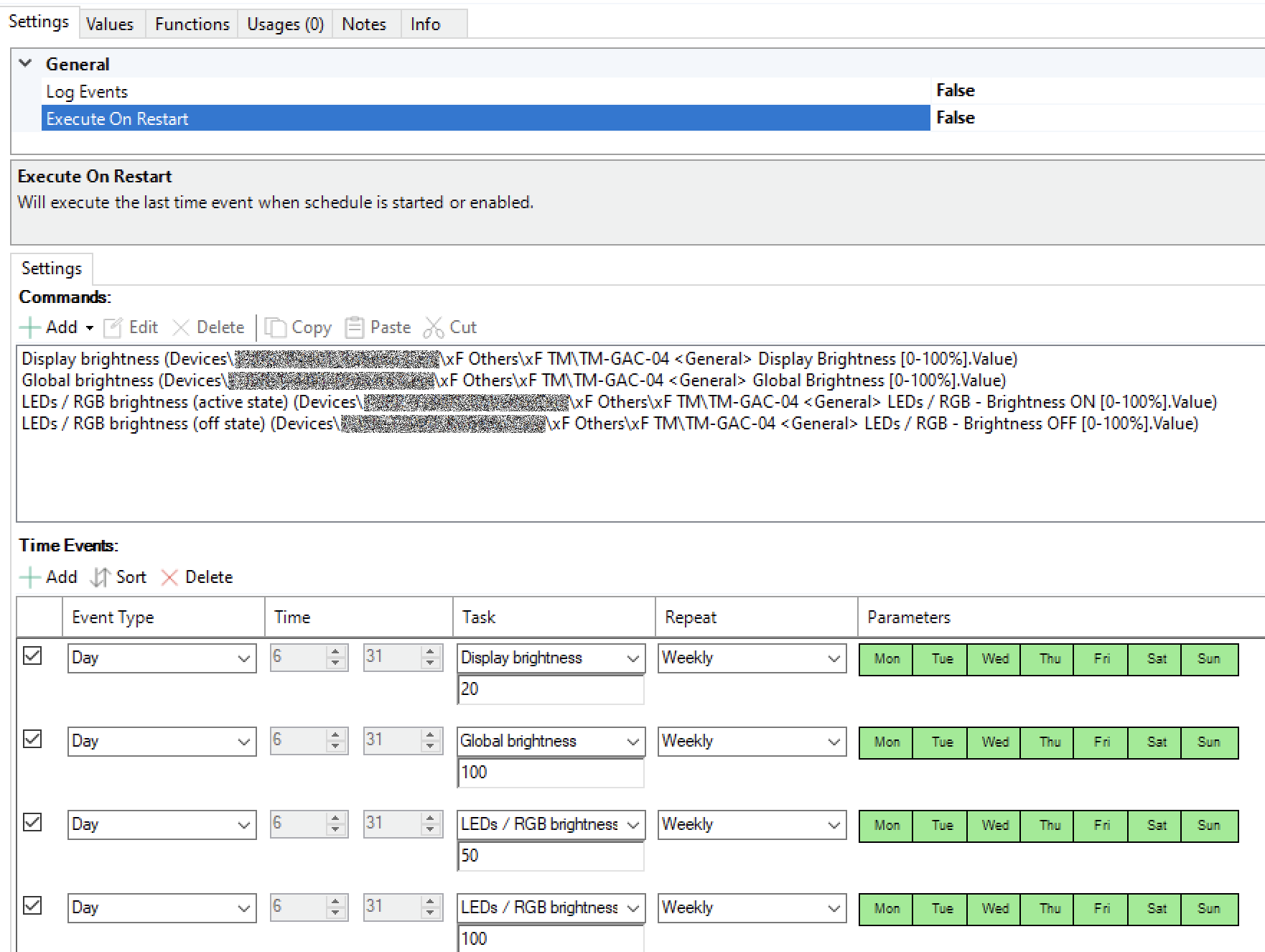
Image 5661

Avatar
Ricardo Pinto

Hello,


Tested with 4.12.0-beta.1, and everything works here...

Created basically the same situation, added 4 different commands, and set them to turn on all at the same time. So I created the same as you, one schedule per command, but all the 4 of them being executed at exactly the same time.


Everything worked, everything turned on as expected at the indicated time...

What version are you using? Jigsaw, Grinder, or own server?

Best regards

Avatar
Grzegorz Kulinski

Hello Ricardo,

I started developing the program on my personal Grinder Black server running Windows 10. Right now, I'm running the system on a client device:
- Grinder Black, 13th Gen, i3-1315U 1.2 GHz
- Windows 11 IoT Enterprise LTSC, 24H2

I tried creating a schedule from scratch, without using the copy-and-paste function. The result was the same. Any ideas on what else I can check?

Best regards

Avatar
Ricardo Pinto

Hello,

I can test with other servers, I have access to plenty of them. I can check among the Grinder ones.

Can you tell me your current version, so I can try to find a client server running on the same version, to try to reproduce the issue?

Best regards

Avatar
Grzegorz Kulinski

Yesterday I updated the server to the latest official version, 4.11.72. No improvement.

I also have another issue with the bottom menu not displaying properly in the visualization. On the main page, I have a floor plan of the apartment, so the menu is hidden, but it’s supposed to be available on the other pages. Unfortunately, after every program update or restart of the bOS Client (iOS, Windows), the menu doesn’t appear. To force the menu to appear, I have to switch the view from portrait to landscape mode, or briefly minimize/resize the bOS Client window to force the interface to refresh.

I’ll have to record a short video to demonstrate this.