E-mail with HTML tags/css (tip)

Avatar
  • updated

Hello everyone,

Ever wondered that the e-mails in plain text sucks?


Well I've got tired, so I got news for you: it's possible to beautify the e-mails sent from bOS.


This was tested with my Gmail SMTP. If you add HTML/CSS tags, the e-mail sent will understand those tags.


On my e-mail body I've added something like:
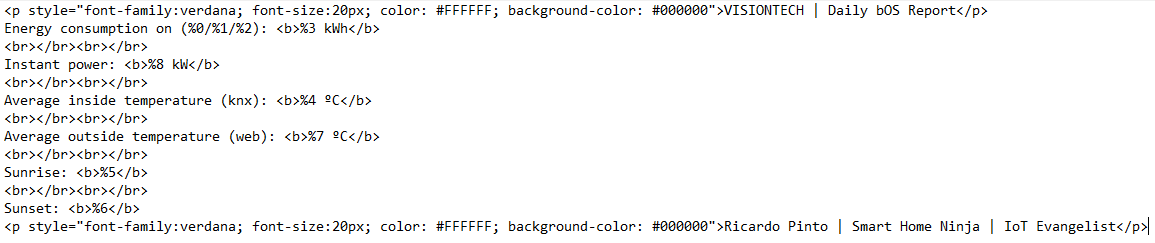
Image 2483

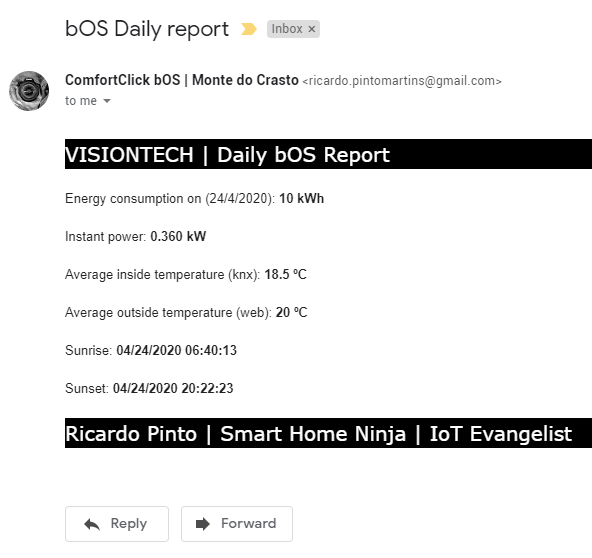
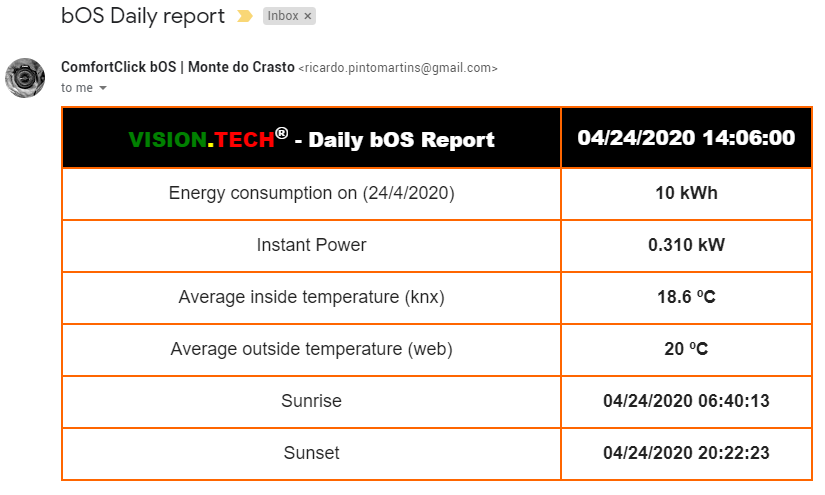
And the result on my inbox was:

Image 2484

Tada!!!


Use it! It's cooler than plain text.

Best regards

Avatar
Ricardo Pinto

More tweaking:

Avatar
Jürgen Jürgenson
Quote from Ricardo Pinto

More tweaking:

That looks really nice! Thanks for the tip.

Hopefully Comfortclick will add some shortcuts in so the formatting will be easier in the future.

Avatar
Fabien Fuster

Definitively, I need to invest time learning CSS & HTML programing...

Thanks for the tip !

Avatar
Ricardo Pinto

Please note that it doesn't support external CSS files, so you have to declare the CSS inside the <head> or on the html tags. At least I've tested and I had some errors. Further testing may be needed.

If you use regular html tags, there's no need to use the <html><body></body></html> tags. At least I've tested and it worked.

If you need to use CSS on the head, you need to insert the <html><head></head><body></body></<html> tags on the e-mail body, otherwise the css won't be read, at least for what I've tested.

Also, some CSS stuff was not loaded on my testings, so be careful and keep it simple.

Best regards